At DevDay on September 29, 2026, OpenAI unveiled dots, an always-on agent. Built on GPT-6 Astra, it is a ChatGPT feature that keeps working around the clock on its own cloud computer even after the conversation ends.
It is available in Korea too. ChatGPT Pro is rolling out gradually everywhere except the European Economic Area, Switzerland, and the UK, and the first dot is included at no extra cost starting from the cheapest Korean Pro tier, ₩159,000 a month.
 Official OpenAI dots announcement page — Source: OpenAI
What was announced
According to OpenAI’s announcement, a dot starts work with most of the work environment you’d give a new hire: its own ID for managing access, a cloud computer and its own browser, and the ability to write and test code when needed.
- Base model: GPT-6 Astra
- Connections: over 4,000 apps via OpenAI plugins
- Where you talk to it: ChatGPT (desktop, web, mobile), Slack, Microsoft Teams, voice calls
- Text messaging: beta for US Pro users only
- Specialized dots for organizations: enterprise-only preview, with Microsoft Agent 365 integration in the works
OpenAI said that internally, when a bug is posted in Slack a dot starts investigating, and when a new design comes in it builds it into a working app. One external early tester’s dot reportedly noticed an invoice the user had forgotten, drafted it, got approval, and sent it.
How it works
 Concept image of an always-on agent — Source: concept image · self-generated with agy
A dot handles several projects at once and moves work forward even while you’re not talking to it. It reads information from connected apps in the background and finds work that needs doing — what OpenAI calls proactive research.
Proactive research is enforced in code to use only read-only tools. During it, the dot can’t send messages, change app content, or operate the browser or computer, and what it finds is kept only as that dot’s private notes.
Connecting your own computer is optional and off by default. Once connected, the dot can use that computer’s files and coding tools; disconnect it and it loses access again.
How it differs from existing agent products
The Agents API, which OpenAI started offering in public beta on September 10, let developers hand off multi-day task runs via API. dots brings the same always-on execution into the ChatGPT interface with no development needed, and is the same kind of product as Meta’s personal agent Muse.
Which plans get it
 Help article on where dots is available — Source: OpenAI (highlighting added)
| Plan | Availability | Region |
|---|---|---|
| Pro | Gradual rollout | Excluding EEA, Switzerland, UK |
| Business Premium | Gradual rollout | All supported regions |
| Enterprise · Edu · Healthcare | Beta once an admin enables it | Off by default |
The first dot is included in the plan, separate usage is provided for deep work, and limits are raised for the first month after launch. Conversations with a dot don’t count toward ChatGPT usage limits, but Codex or ChatGPT Work tasks you assign to a dot count as usual.
OpenAI said it will later launch options to add more dots, or to raise each dot’s speed and monthly workload. Pricing for those hasn’t been announced.
Pricing in Korea
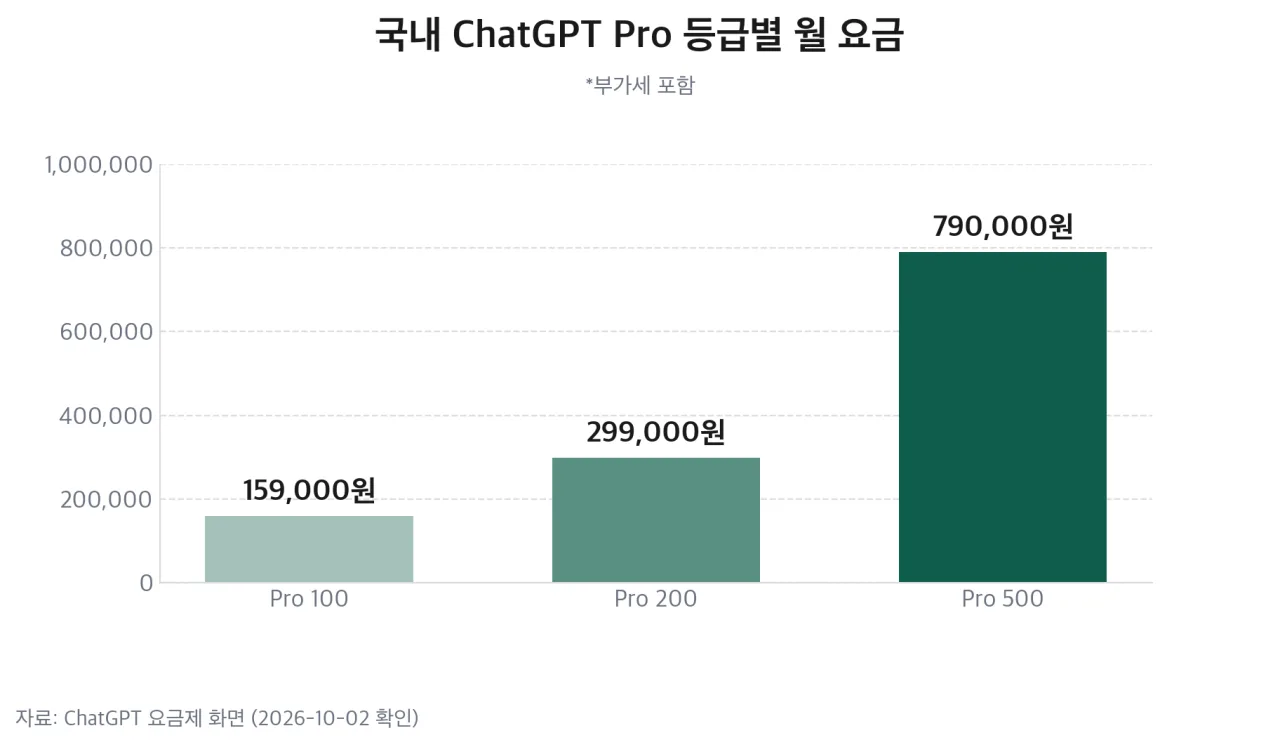 Monthly prices of ChatGPT Pro tiers in Korea — Source: self-rendered from the ChatGPT pricing page
On the Korean ChatGPT pricing page, Pro comes in three tiers, all shown in won including VAT. Each tier has different usage, and OpenAI said the first dot is included in Pro. The benefit lists for the ₩159,000 and ₩299,000 tiers also include “Dots, your own always-on agent.”
A Business Premium seat, the company plan, costs $100 (₩140,000) a month billed annually or $125 (₩175,000) billed monthly. Business prices are shown in dollars, so the cost in won depends on the exchange rate.
A dot can only be created in the ChatGPT desktop app or on the desktop web. You can’t create one on mobile, but once created you can message it from the mobile app.
User approval and things you do yourself
On the same day, OpenAI separately published dots’ safety and security design. Before a dot sends an email or changes a file, a separate system called automated review checks whether the action fits your instructions, custom rules, and safety requirements.
| Action | Handling |
|---|---|
| Reading, analyzing, drafting | Proceeds immediately |
| Purchases with a saved card | Requires user approval |
| Permanent deletion · installing external software | Confirmed every time |
| Changing passwords · bank transfers | User does it directly |
To share health information, the user has to name the recipient directly, and for email addresses and phone numbers the user has to define the recipient category (e.g., all airlines). Custom rules can widen the scope but can’t remove these baseline safety requirements.
The automated review system sits in an environment the dot can’t modify, so the dot can’t turn off mandatory checks. On supported sites it uses secure sign-in, which logs in without showing the password to the model, but OpenAI noted that passwords written down separately in messages or documents can be exposed to the model.
Malicious instructions inside web pages
Against prompt injection — steering an agent with instructions hidden in web pages, emails, or documents — OpenAI said it applies tool-use restrictions, pre-execution checks, and monitoring in multiple layers. If monitoring detects a concern, it stops the task and shows the user a warning.
Data and training
 OpenAI logo — Source: OpenAI
Data in ChatGPT Business, Enterprise, and Edu workspaces isn’t used for model training by default. On personal plans, conversations with a dot and the work it does may be used for training depending on the “Improve the model for everyone” setting.
Proactive research and its notes aren’t used for training directly. But if those notes are included as reference material in a conversation that is subject to training, they may be trained on along with it, depending on your settings.
Disconnecting an app doesn’t delete information the dot has already collected. To erase it you have to reset the dot, which deletes all conversations, notes, and scheduled tasks.
What to watch next
- Pricing for the options to add dots and increase speed
- The timeline for specialized organizational dots and Microsoft Agent 365 integration
Sources
- [OpenAI] Introducing dots (2026-09-29; features, plans, specialized dots; source of one image in this post)
- [OpenAI] How we build safety, security, and privacy into dots (2026-09-29; automated review, action rules, training policy)
- [OpenAI Help Center] Getting started with your dot (regions, creation, reset; source of one image in this post)
- [OpenAI] ChatGPT pricing (Korean Pro prices in won, Business seat prices; checked 2026-10-02)
- Exchange rate: converted at $1 ≈ ₩1,400