Claude Code now has mods. From cosmetic tweaks like changing the spinner text to guards that intercept and block Claude’s commands, a few lines of TypeScript functions can modify Claude Code’s internal behavior.
 Demo mod that shows the tool call count next to the spinner — Source: Anthropic
What mods are
A mod is a bundle of JavaScript/TypeScript functions that Claude Code calls every time an event occurs. Tool calls, prompt submissions, and screen rendering are events, and a function can watch an event, modify it and pass it on, or respond directly in place of the original behavior.
Anthropic’s developer account announced the feature on October 1. It is enabled by default from v2.1.287 in the terminal and from v2.1.286 in the Code tab of the desktop app. I tested on v2.1.292.
The difference from existing extension mechanisms is where the code runs.
| Mechanism | Where it runs | Screen rendering |
|---|---|---|
| mod | Inside the Claude Code process | Yes |
| Settings hook | External script / HTTP | No |
| Skill | Document Claude reads | No |
| MCP server | External process | No |
The /diff pane and AGENTS.md loading now also run as built-in mods. The first example in the official docs is a mod that counts tool calls and shows the count next to the spinner — the demo above is its result.
A guard mod I built
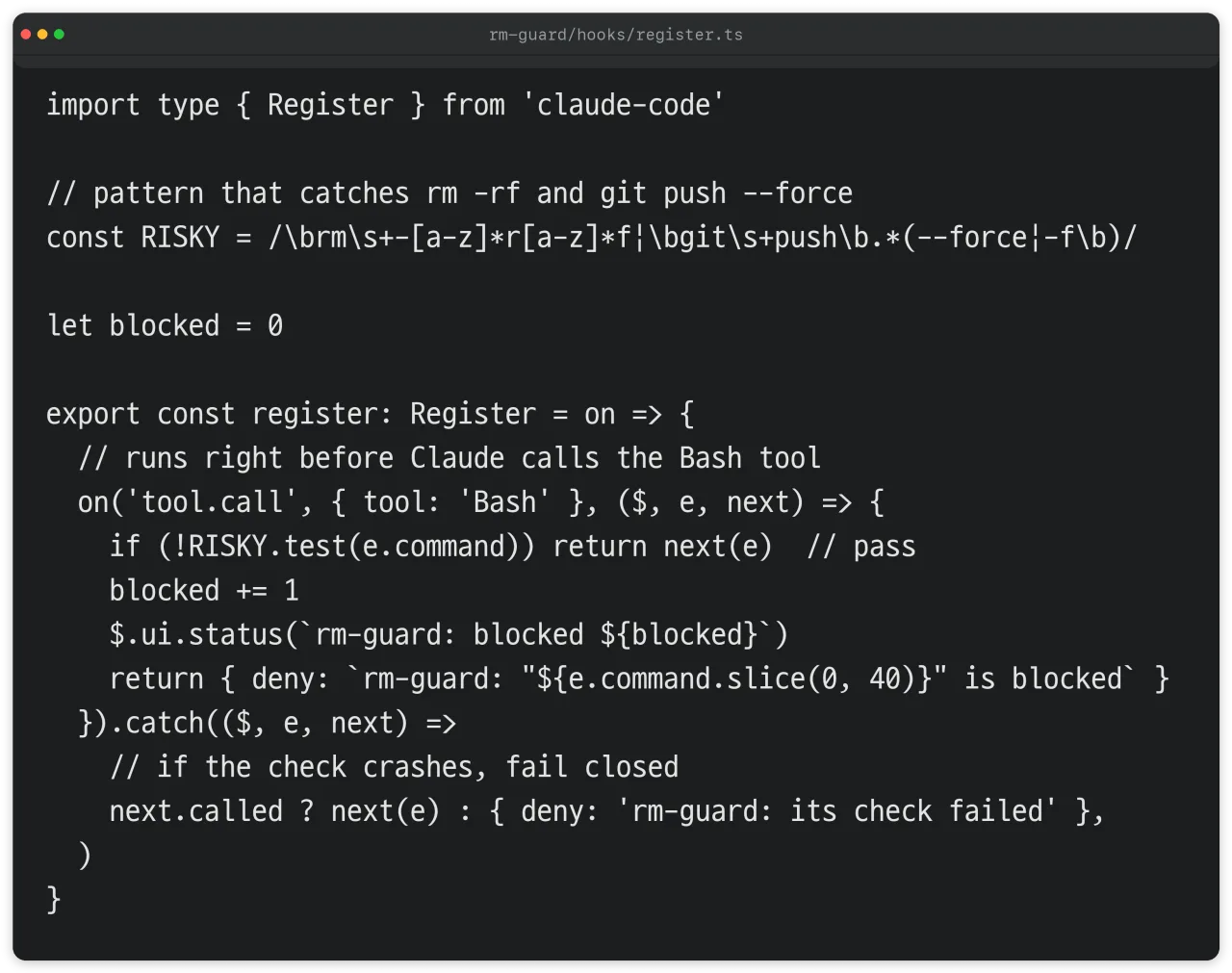 rm-guard hook module code — Source: self-written code, self-rendered
First, I built rm-guard, which blocks Claude when it tries to run rm -rf or a force push through Bash.
[.claude-plugin/plugin.json] Plugin manifest with name, version, and description
[hooks/hooks.json] One line with the hook module’s file path
[hooks/register.ts] The main file that registers functions on events
It picks out only Bash calls on the tool.call event, and if the command matches the pattern it returns deny to block execution. Otherwise it passes the call to the original flow with next(e), and each time it blocks, it shows the running count in the status line.
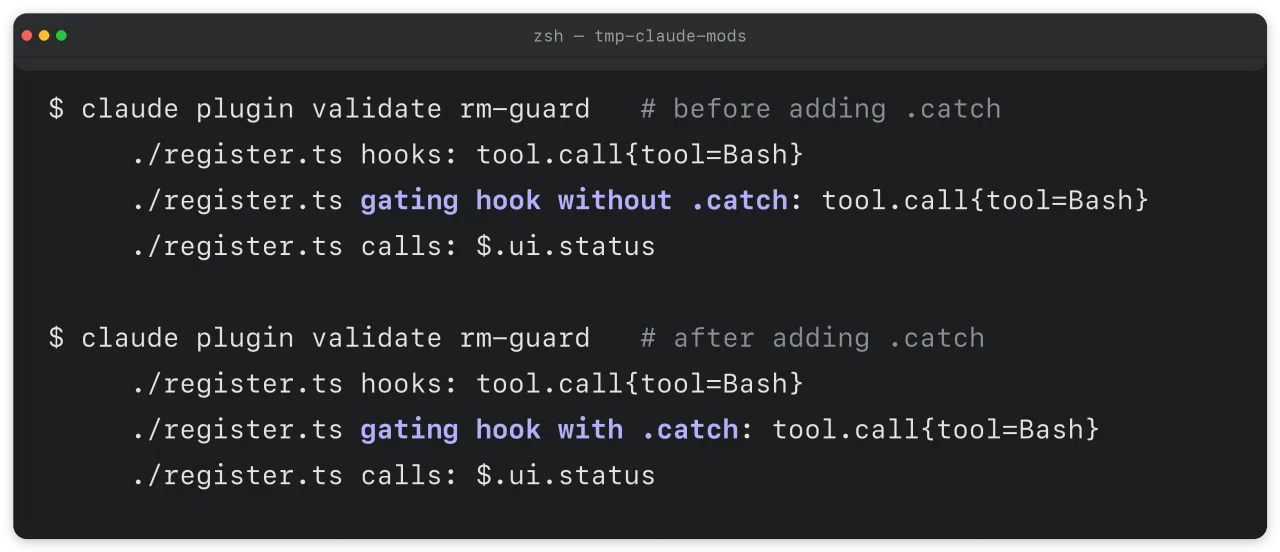 rm-guard validate output before and after — Source: claude plugin validate output, self-rendered
claude plugin validate showed a “gating hook without .catch” warning on the first version. It means a hook that does the blocking has no error handler. According to the official docs, if a hook throws or exceeds its time limit Claude Code skips that hook, so a bug in the check code lets the command run as is. After I added .catch so a failed check denies the call, the warning changed to “with .catch”.
The guard’s limits, confirmed by tests
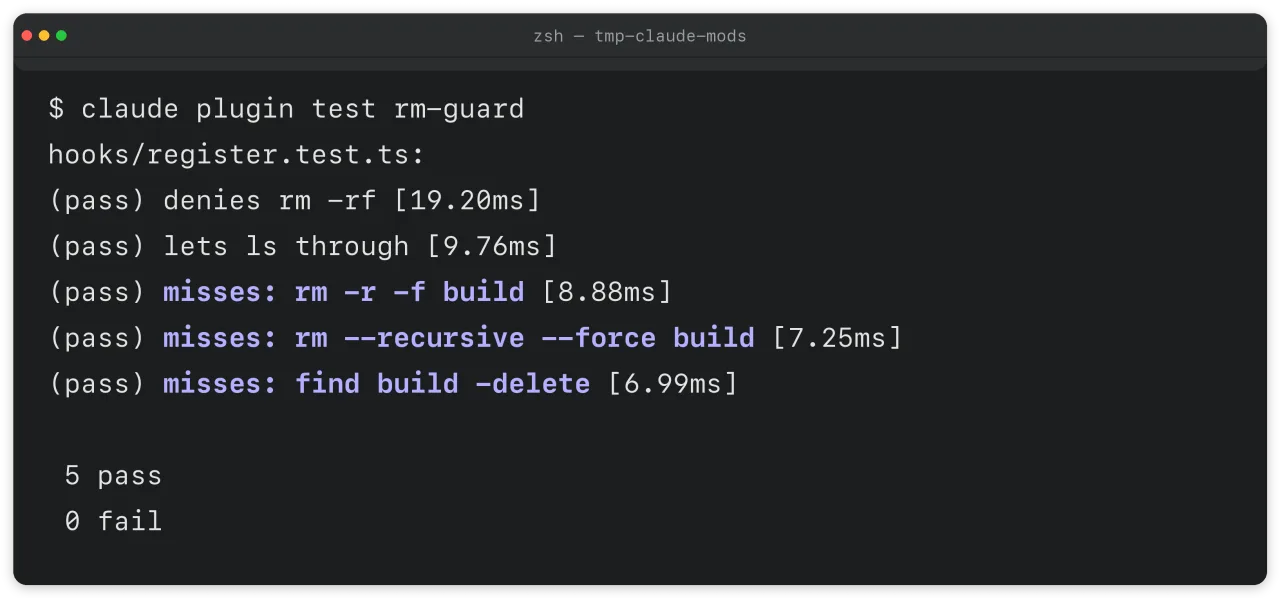 rm-guard results for 5 tests — Source: claude plugin test output, self-rendered
claude plugin test runs a mod’s test file without a session. I entered five cases, and the first two worked as intended: blocking rm -rf build and letting ls through.
The other three were different spellings that do the same thing, and none of the three was blocked.
| Command | What it does | Guard result |
|---|---|---|
| rm -rf build | Force-delete folder | Blocked |
| rm -r -f build | Same | Passed |
| rm –recursive –force build | Same | Passed |
| find build -delete | Same | Passed |
A guard that filters commands with string patterns can’t catch a command that only changes its spelling. Anthropic’s sample mod blast-radius is also meant to detect and flag dangerous shell commands; mods like this add one more safety measure, not isolation. Paths that must not be deleted should be blocked with deny rules in settings.json, and if you need Bash isolation, enabling the Claude Code sandbox is the right tool.
One-line summary: a mod guard reduces mistakes, but it can’t block commands that are trying to get around it.
The permissions mods get
Mods have no sandbox. The official docs state that a mod runs with the permissions of the user who installed it and can read and write files, run programs, and make network requests.
| What it can do | Related API |
|---|---|
| Read and write files | $.fs.read · $.fs.write |
| Run programs | $.process.run |
| Network requests | $.http.fetch |
| Read environment variables and settings | $.env.get |
| Call models | On the user's plan |
| Approve tool calls | tool.check hook |
A mod can approve calls that an ask rule would have prompted for, and in auto mode, calls approved by a mod run without the classifier check. Even with the Claude Code sandbox enabled, what gets isolated is the Bash commands Claude runs; processes started by a mod run outside the sandbox.
Deny rules have a defined scope too. Where the built-in guard is loaded, deny rules take precedence over a user mod’s approval, but this applies only to Claude’s tool calls. Even if you block Read(.env) as in the official docs’ example, a mod can read that file directly with $.fs.read.
On devices logged in with a Team or Enterprise plan or with managed settings, the built-in guard sec-default loads before user mods and prevents user mods from modifying the hooks, instructions, and settings the organization manages. For individual users on an API key alone, this guard doesn’t load unless there are managed settings.
How to inspect someone else’s mod before installing
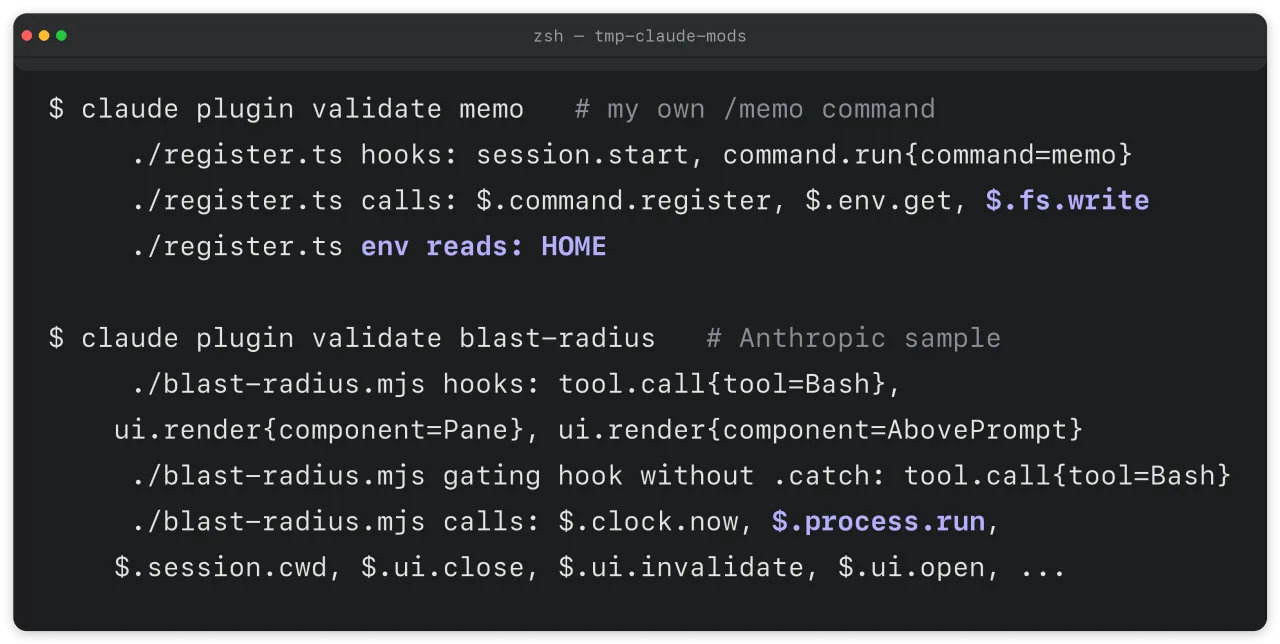 validate output for my memo mod and Anthropic’s sample blast-radius — Source: claude plugin validate output, self-rendered
claude plugin validate reads only the code without running the mod and shows which events it receives (the hooks line) and which APIs it calls (the calls line). Claude Code refuses to load a mod that uses APIs in a way this command can’t analyze.
The second mod I built, memo, saves text received through a /memo command to a file in the home folder. validate showed $.fs.write along with env reads: HOME, indicating before execution that the mod writes files and reads the HOME environment variable.
I checked two official Anthropic samples the same way. token-weather, which draws context usage, called only usage lookup and screen rendering, while blast-radius runs programs with $.process.run and got a warning that its blocking hook has no .catch. Since even the official sample runs processes, having $.process on the calls line doesn’t make a mod malicious. When you see that line, it means you should open the code and read what it runs.
On the hooks line, look for tool.call and prompt.submit. Both mean the mod can see and change every tool call and prompt, and tool.check means it can approve or deny before a permission prompt appears.
Read alongside the earlier post on allowlists that reduce permission prompts, the scope of approvals a mod takes over becomes clearer.
Skills in Practice (3) — 81% of 12,411 Claude Code Commands Never Needed to Ask (in Korean)
What users and organizations should do
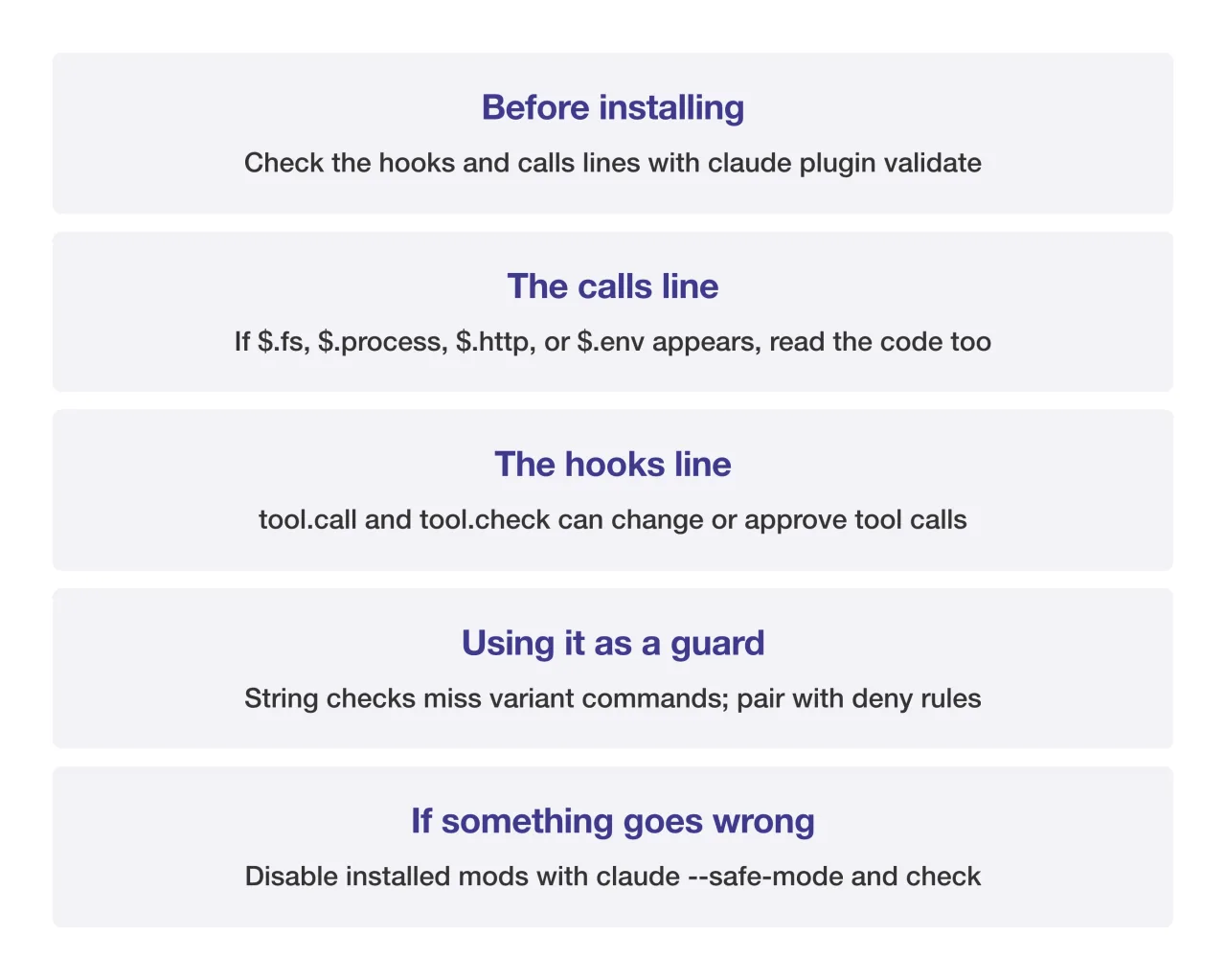 mods checklist card — Source: self-rendered from Anthropic official docs
Organization admins
- To restrict user mods, enable the sec-default option allowManagedModsOnly in managed settings
- To allow only approved marketplaces, block –plugin-dir loading with disableSideloadFlags
- You can build a policy mod that rejects mods using risky APIs on the plugin.register event
Organizations in Korea can apply the same settings through managed settings files, MDM, or the claude.ai admin console; there is no Korean official documentation yet, so the English original is the reference.
Sources
- [Anthropic] Mods overview (definition, capabilities, versions, no sandbox; source of 1 image in the body)
- [Anthropic] Manage mods for your organization (sec-default, deny rule scope, reading validate)
- [Anthropic] Create a mod (file layout)
- [GitHub] anthropics/claude-code-playground mods (token-weather and blast-radius samples)
- [Pasquale Pillitteri] Claude Code Gets Mods, Plugins That Rewrite the Agent (October 1 announcement)