When people say a server went down, it usually doesn’t mean the server computer lost power. It’s a broad term for a state where the server can’t return a response to the user who sent a request within a set time.
The incident in which UwayApply froze 10 minutes before the early-admission application deadline on September 11, 2026 is one such case. The timeline and relief results are covered separately.
College Application System Outage — UwayApply Froze 10 Minutes Before the Deadline
 Concept image of a server hit by a flood of requests at once — Source: concept image · self-generated with agy
What a server outage looks like, and wait times
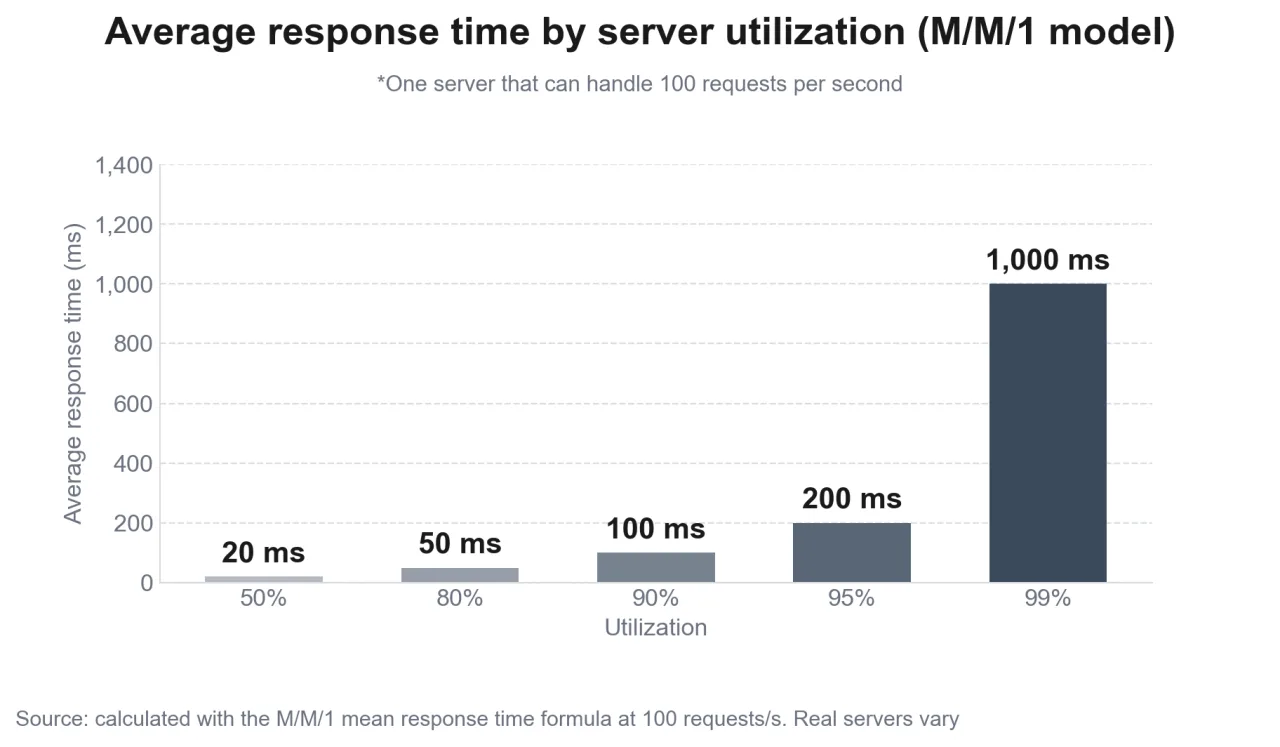 Average response time by utilization — Source: calculated directly with the M/M/1 queueing formula · self-rendered
What appears on the user’s screen
When a user presses a button, the browser sends a request to the server, and the server uses CPU, memory, threads (units of work that handle tasks concurrently), and network connections to produce a response. Each server has a fixed amount of these resources. On the user’s screen, a server outage usually shows up in one of three forms.
[Slow response] The screen freezes and keeps waiting, then ends in a timeout
[Error response] The server rejects the request and returns an error code such as 503
[Process termination] The server program stops or keeps restarting, so it can’t even connect
The three can also appear in sequence. When responses slow down, requests in progress pile up, and when the piled-up requests fill memory, the process terminates abnormally.
How fast the queue grows
When a server has no room to handle incoming requests, it puts them in a queue to wait their turn. In M/M/1, the simplest model in queueing theory, the average response time is 1/(μ−λ). μ is the number of requests the server can handle per second, and λ is the number of requests coming in per second.
- At 50 requests per second (50% utilization), average response 20ms
- At 90 per second (90%), 100ms
- At 99 per second (99%), 1,000ms, 50 times the 50% figure
Utilization went from 50% to 99%, less than double, yet response time went up 50 times. That’s because the queue grows quickly as the incoming volume approaches processing capacity. If incoming requests exceed capacity (λ>μ), the queue keeps growing with no chance to shrink and eventually hits memory or time limits.
Services where people pile in at a set time, such as just before an application deadline, the moment ticket sales open, or the moment course registration opens, fall into this range. Even if usual utilization is low, it’s enough for λ to exceed μ for just those few minutes.
How overload spreads into a cascading failure
 Concept image of a cascading failure spreading overload from server to server — Source: concept image · self-generated with agy
Site Reliability Engineering (the SRE book below), which documents Google’s operating methodology, explains that most cascading failures start directly from server overload or are variations of it. When one or two servers stop due to overload, the load shifts to the remaining servers, and they stop too, and so it spreads.
How retries amplify load
When users press refresh or a program automatically resends failed requests, the rejected requests add to the next moment’s load. The SRE book gives the example of sending 10,100 requests per second to a backend whose limit is 10,000 per second.
| Point in time | Requests the backend receives (per second) |
|---|---|
| Start | 10,100 (100 rejected) |
| 1 second later | 10,200 (100 retries added) |
| 2 seconds later | 10,300 (200 retries) |
It started only 1% over, but as retries pile up every second, fewer requests succeed on the first try, and the backend runs out of resources and stops.
How requests that never finish hold onto resources
Another calculation in the SRE book assumes a server that handles 1,000 requests per second (100ms per request) with 1,000 threads. If 5% of requests get no response and stay waiting until a 100-second timeout, that 5% takes up the equivalent of 5,000 threads, and the server ends up handling only 19.6% of requests. Even though 95% are normal requests, throughput drops to a fifth.
Outages are frequent right after changes
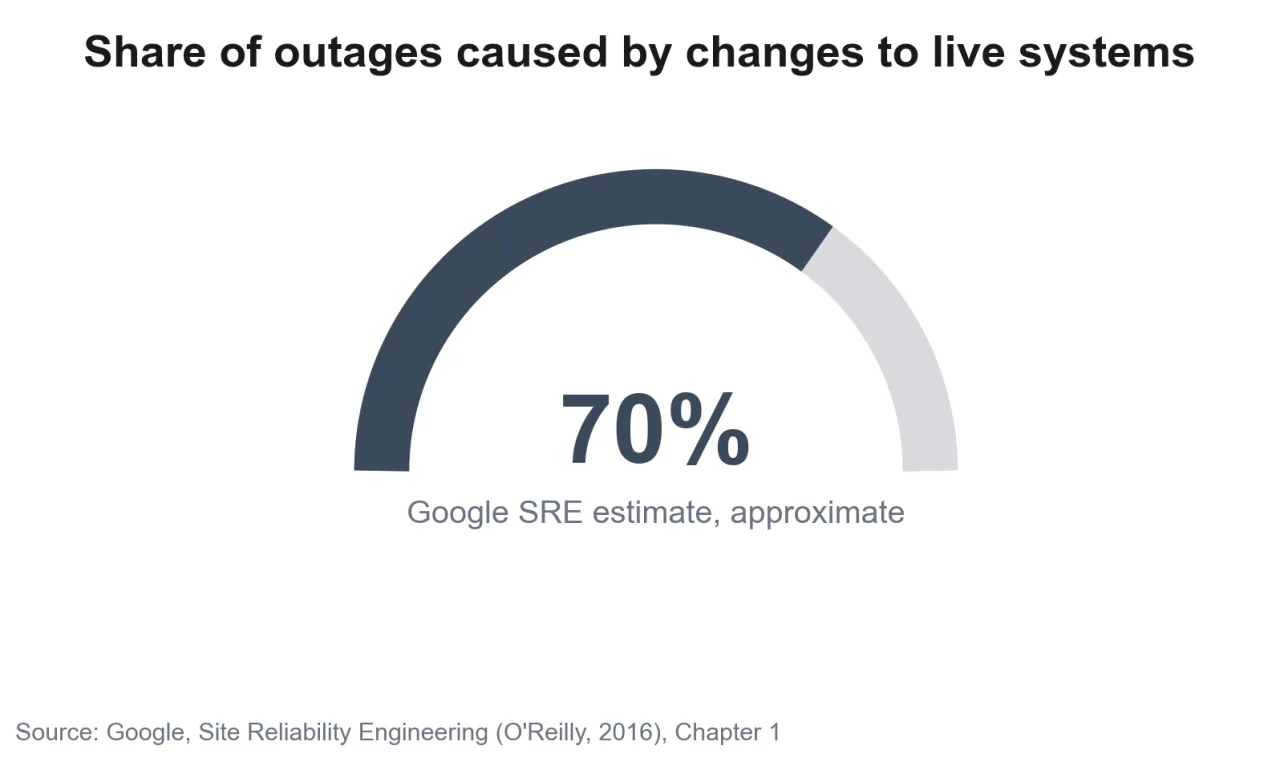 Share of outages caused by changes to live systems — Source: self-rendered based on figures in Google’s SRE book
A surge of traffic alone doesn’t stop a server. A common trigger for a system that handled its usual load to suddenly stop is a change. The SRE book notes that in Google’s experience, about 70% of outages arise in the process of changing a live system.
When equipment is moved or a program is upgraded, bugs that didn’t show up under usual traffic can surface for the first time at peak load. In explaining the cause on September 14, Uway said bug checks were insufficient during a recent equipment move and program upgrade, and that the same symptoms also appeared on the night of September 10, the day before the deadline.
The SRE book recommends three responses.
- Roll out changes gradually, starting with some servers, rather than all at once
- Detect problems quickly and accurately
- Roll back safely when a problem occurs
How to prevent server outages
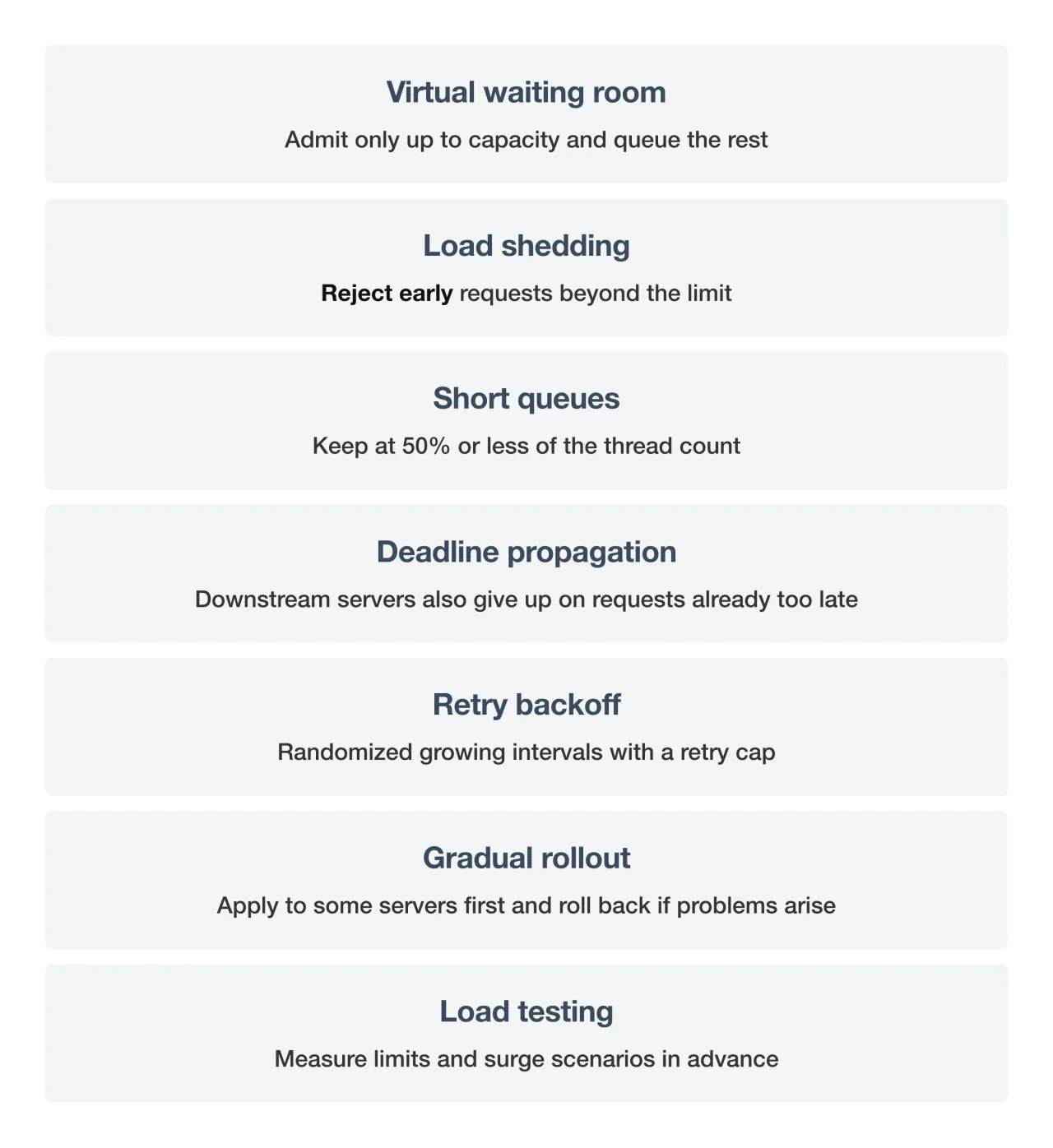 Summary of ways to prevent server outages — Source: summary of the article · self-rendered
Services where the time of peak traffic is known in advance set up a virtual waiting room. STCLab, which makes the Korean queueing solution NetFUNNEL, describes this approach as controlling traffic by setting an admission count matched to the system’s processing capacity. Users who can’t get in wait while seeing their place in line and estimated wait time, and λ inside the server stays below μ.
The server-side defenses the SRE book lists are load shedding, short queues, deadline propagation, retry backoff, and load testing. In particular, for systems with steady traffic, it explains that it’s better to keep queues short, at 50% or less of the thread count, and reject requests you can’t handle early.
Load shedding drops some requests, so it looks inconvenient, but compared with accepting everything until the whole server stops, it lets the rest of the users’ requests be handled normally. On the user side, it’s worth knowing that repeatedly pressing refresh on a frozen screen adds to the retry surge.
Sources
- [Google SRE] Site Reliability Engineering, Addressing Cascading Failures (retry amplification, 5% latency calculation, responses)
- [Google SRE] Site Reliability Engineering, Introduction (about 70% of outages caused by changes, gradual rollouts)
- [Google SRE] Site Reliability Engineering, Handling Overload (handling overload)
- [Wikipedia] M/M/1 queue (average response time formula)
- [STCLab] Can NetFUNNEL virtual waiting room queue information be accurate? (admission count approach)
- [Korea University Newspaper] Uway, whose early-admission system froze, was unstable the day before too (equipment move and upgrade as cause, 2026-09-14)