The term web shell comes up often in reports of breaches in Korea. Both the Yoido Full Gospel Church incident and the AI agent attack disclosed by the Financial Security Institute in September went through the installation of a web shell.
 Concept image of a hidden passage inside a web server — Source: concept image · self-generated with agy
What a web shell is
A web shell is a script file an attacker uploads to a web server. Because it’s written in the languages used to build websites (PHP, JSP, ASP, and so on), the server runs the file just like any other web page. Simply by sending a request to that file’s address with a browser, the attacker can run commands on the server.
In an April 2020 joint guide, the US National Security Agency (NSA) and the Australian Signals Directorate (ASD) defined a web shell as malicious code installed on a victim’s web server that executes arbitrary system commands.
[Ordinary web page] Offers visitors only predefined screens and functions
[Web shell] Looks like the same kind of web file but becomes a means of running server commands
Conditions for installing a web shell
A web shell doesn’t install itself on a server. The attacker first needs a vulnerability or permission that lets them write files to the web folder.
| Precondition | Example |
|---|---|
| Weak file upload validation | Scripts allowed instead of images |
| Unpatched vulnerability | Web server, CMS, plugins |
| Stolen admin account | Upload via admin page |
| Write access to web folder | Web server account can write |
Why web shells are dangerous
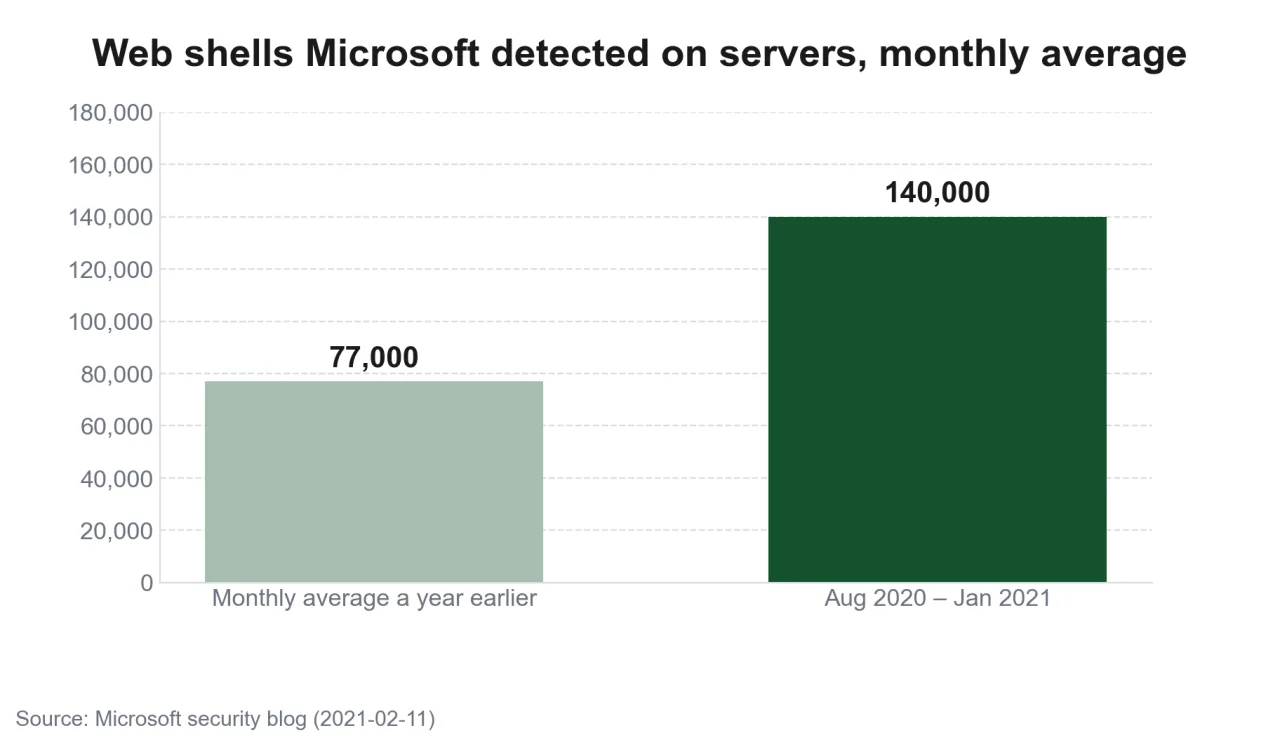 Chart of Microsoft’s average monthly web shell detections — Source: self-rendered from Microsoft’s announcement
Microsoft said it detected an average of 140,000 web shells a month on servers from August 2020 to January 2021, nearly double the 77,000 of a year earlier.
[They persist] If the file remains even after a server reboot or account password change, the attacker can get back in
[Hard to tell from normal traffic] Same ports and format as ordinary web requests, so they pass straight through firewalls
[They become a path into internal networks] A route into the DB, ERP, and internal systems the web server can reach
In the church incident, too, the attacker was analyzed as having broken into the ERP server with a web shell and then obtaining database administrator privileges. In the case the Financial Security Institute disclosed in September, the attacker had an AI agent scan the Oracle WebLogic servers of about 300 financial companies in Korea and abroad and even instructed it to install web shells, but the Financial Security Institute detected and blocked it before the next step.
The earlier post on the church hacking covered how this route led to the leak of member information.
Yoido Full Gospel and SaRang Church Hacked — Signs of About 1.05 Million Member Records Leaked
Prevention
The NSA–ASD guide’s prevention recommendations limit both the routes for installing a web shell and the privileges available after installation.
| Recommendation | Risk reduced |
|---|---|
| Patch web applications | Entry via known vulnerabilities |
| Remove write access to web folders | File installation itself |
| Allowlist upload extensions | Script uploads |
| Disable execution in upload folders | Running uploaded files |
| Web application firewall (WAF) | Known attack requests |
| Segment internal networks | Spread to DB and internal systems |
The guide describes restricting web folder permissions as the most effective measure. If the web server account can’t write files to the web folder, a web shell file is hard to install even when a vulnerability exists. It says that where permissions are hard to change, using file integrity monitoring to block or get alerts on changes to the web folder has a similar effect.
If the web server sits on the same network as the DB and ERP, a single web shell becomes a path into internal systems. Segmenting the network so the web server can reach only the internal addresses it truly needs reduces how far a web shell can reach even if one is installed.
Detection
The NSA–ASD guide presents comparison against a known-good version as the best detection method. It compares a verified original web application with the files on the running server, and a person checks any file that isn’t in the original or has changed.
| Method | What it checks |
|---|---|
| Known-good comparison | Files not in the original |
| File integrity monitoring | New or changed files in the web folder |
| Web log analysis | New paths that are rarely called |
| Network monitoring | Unfamiliar outbound connections from the server |
| Server security products (EDR) | Processes launched by the web server |
The guide also warns not to trust file time information on a suspect server, because attackers sometimes change a file’s creation and modification times to disguise it as a file that was always there. Web shells can also hide in non-executable formats such as images, so blocking by extension alone doesn’t work.
If you find one
Deleting only the web shell file leaves the intrusion route in place. Take the server off the network and preserve the files and web logs before deleting anything, so you can determine when and how the intrusion happened. Change the account passwords and DB connection credentials used on that server, and compare against the known-good version again to see if there are other files in the same web folder. If the system stored personal information, also check whether you’re obligated to report to the Personal Information Protection Commission and KISA.
Support tools in Korea
 Korea Internet & Security Agency logo — Source: KISA
KISA distributes WHISTL, a detection program that helps server administrators find web shell files and sites hiding malware, for free. It is for small and medium-sized enterprises as defined by the Framework Act on Small and Medium Enterprises; individuals, government agencies, and public institutions can’t use it. You can apply on KISA’s security tools site, where SMEs can also apply for a free remote vulnerability check of their websites.
🔗 Link - https://toolbox.krcert.or.kr
WHISTL detects web shells that are already installed; it doesn’t prevent website hacking itself. If you suspect a breach, you can report it to the KISA 118 call center or Boho Nara.
Checklist for operators
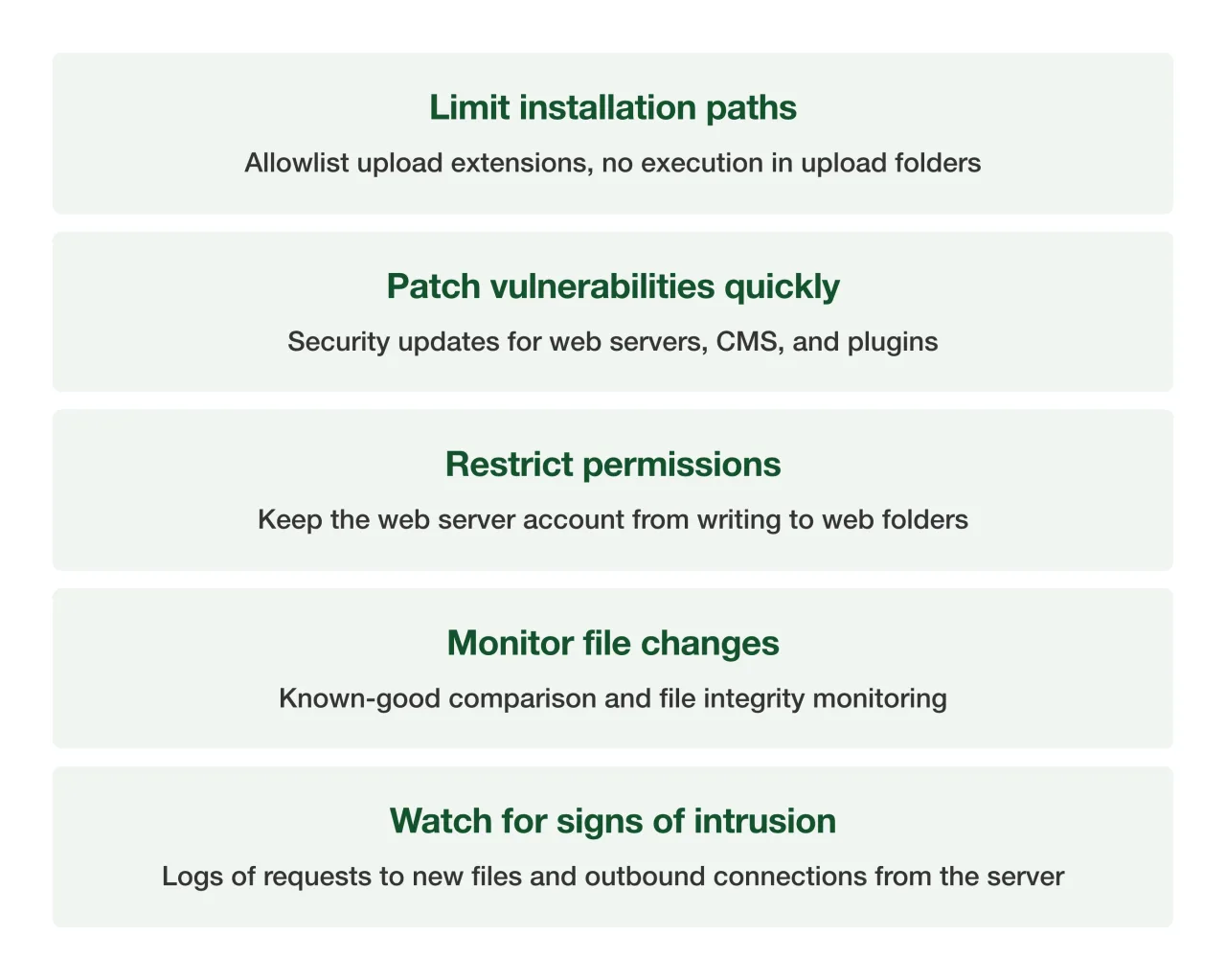 Web shell prevention and detection summary card — Source: self-rendered from the NSA–ASD guide
There’s no way for ordinary users to check whether a website they visit has a web shell. What users can do is change their password when they get a leak notice, and also change it on other services where they used the same password.
Sources
- [NSA, ASD] Detect and Prevent Web Shell Malware (2020-04-22, definition, detection, prevention recommendations)
- [GitHub] nsacyber/Mitigating-Web-Shells (guide appendix repository)
- [Security Affairs] Microsoft warns of the rise of web shell attacks (140,000 a month on average)
- [Byline Network] Financial Security Institute’s AI agent attack case (WebLogic, web shells)
- [Boan News] KISA web shell detection program WHISTL (eligibility, how to apply)